![elentra_logo_Blue-and-Black-3.png]](https://help.elentra.com/hs-fs/hubfs/elentra_logo_Blue-and-Black-3.png?height=40&name=elentra_logo_Blue-and-Black-3.png)
This release introduces AI Assessment Comment Summaries on the CBE Learner Dashboard and the ability to merge external assessors into existing internal user accounts. Improvements have also been made to tutor profiles, course website rollovers, attendance notifications, and distribution setup. Read more about this week's updates below!
NEW! AI Assessment Comment Summaries – CBE Learner Dashboard
AI Assessment Comment Summaries are now available on the CBE Learner Dashboard, helping reviewers and learners identify recurring themes and performance trends across narrative assessment feedback.
Each AI-generated summary is organized into five sections:
- Summary: An overview of learner progress.
- Rating Trend: Changes in performance over time.
- Strengths: Consistently highlighted strengths.
- Areas to Develop: Opportunities for growth.
- Suggested Next Steps: Actions to support continued development.
Reviewers can copy or regenerate summaries and provide feedback on their usefulness. Each summary links back to the underlying assessment evidence, keeping educators in control of progress decisions.
Learners can also access summaries to better understand their feedback and prepare for conversations about their progress.
This feature is disabled by default and can be enabled by administrators for their organization. Every point in the summary links back to the assessments behind it so reviewers can check the source comments at any time. Summaries describe the evidence only. Progress decisions remain with committees and coaches. Visit the Knowledge Base for more information.
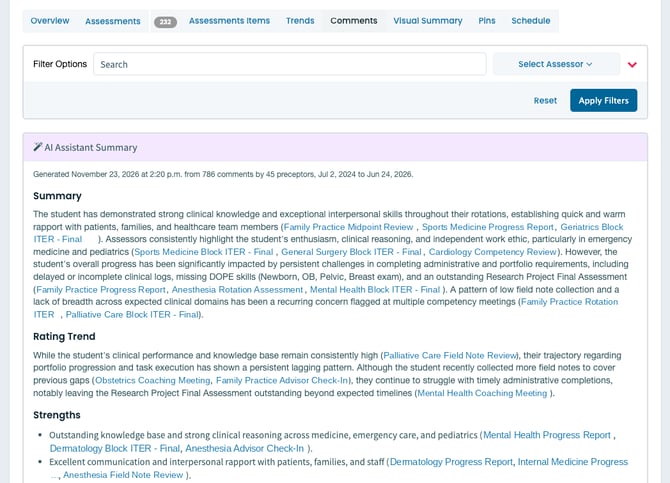
Example AI Assistant Summary. This feature is disabled by default.
NEW! Merge External Assessors into Internal User Accounts
Administrators with the the permissions to manage users can now merge an external assessor into an existing internal user account without contacting Elentra Support. Choose the external assessor and the internal user, review a summary of what will move, and then confirm. Pending tasks and completed assessments are brought together under one account, which keeps assessment history complete and easy to follow.
For more information please review the updated External Assessors documentation.
Improved Learner Visibility for Tutors
Previously, an issue where learners assigned to a tutor's group did not appear under My Learners in the tutor's profile. With this update, tutors can now view all learners assigned to their groups directly within the My Learners section of their profile, making it easier to view and follow up with learners.
Course Website Rollovers
Enhancements have been made to the course website rollover process to ensure all existing administrators and members are carried over. Everyone from the earlier version, including admins, now carries over as expected, reducing manual work when preparing for a new academic year.
Attendance Notifications
Program coordinators and faculty now receive email notifications when learners are marked late or absent, including excused absences, supporting timely follow-up.
Curriculum Period Filtering in the Distribution Wizard
Previously, selecting a course first in the distribution wizard did not limit the course period choices to that course. Selecting a course now filters the available curriculum periods to those associated with that course, streamlining distribution setup and improving accuracy.
If you have any questions about the above-listed information, please contact support@elentra.com. If you see a feature that is not currently being used within your instance of Elentra and are interested in learning more about it, please contact your Elentra Account Manager for more information.