![elentra_logo_Blue-and-Black-3.png]](https://help.elentra.com/hs-fs/hubfs/elentra_logo_Blue-and-Black-3.png?height=40&name=elentra_logo_Blue-and-Black-3.png)
This release introduces self-service Turnitin setup and monitoring, centralized clinical agreement tracking, and CSV exports of EPA achievement data. It also improves attendance accuracy and supports longer response text in the Learning Object Statement report.
NEW! Set Up and Monitor Turnitin From Within Elentra
Administrators can now connect, check, and repair the Turnitin Similarity integration directly in Elentra. A new Turnitin Settings page under Admin > System Settings replaces the need to submit a support ticket with API details. Get Turnitin up and running on your own schedule and spot connection issues as soon as they happen.
- Turn Turnitin on where it’s needed: Turnitin can be switched on or off for each organization, so it can run in one program and not another.
- Test before saving: Elentra checks the Turnitin API address and key before anything is saved, so setup errors are caught right away.
- See whether reports are flowing: A status panel confirms that Turnitin is returning Similarity Reports. It shows recent activity and offers a one-click Repair if something needs attention.
Existing Turnitin connections carry over unchanged, and learners and graders will see no difference in drop boxes. To learn how to connect and manage Turnitin, see the Turnitin Similarity Integration Knowledgebase Article.
NEW! Agreements tab in Clinical Experience
See which agreements need attention and which bookings they affect, all in one place.
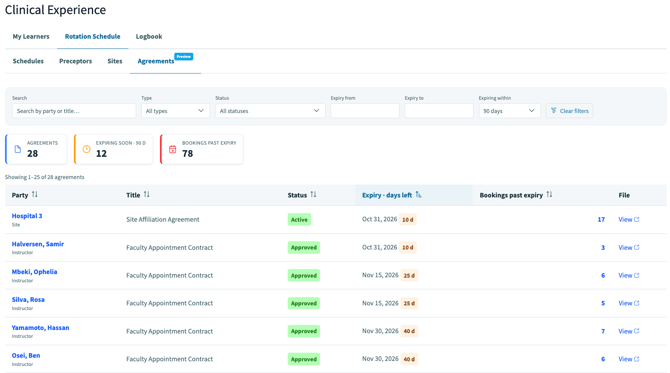
The new Agreements tab, now available in Clinical Experience, brings every site and instructor agreement in your organization into one view. It turns agreement tracking into a clear, prioritized picture of what needs action and how it affects your schedules.
At a glance, you can see:
- What’s expiring soon. Agreements coming due in the next 30, 60 or 90 days, each with a days-left countdown.
- Which bookings are affected. Learner bookings that run past an agreement’s expiry, counted and ready to review.
Click any bookings count to see exactly which placements are affected. From there, jump straight to the site or instructor record to renew and keep learners on track. Status, expiry dates and proof-of-agreement files are all in one searchable, sortable table.
With agreement status and its impact on bookings in one place, your team can catch expiring agreements earlier, renew them sooner and plan learner schedules with confidence.
Attendance Status When Updating Learner Notes
Addressed an intermittent issue where adding an attendance note to a learner in a learning event could incorrectly mark that learner as absent. Learners with self-attendance enabled will now continue to see the option to mark their own attendance, and adding or removing an administrative note will no longer change their attendance status.
Thank you to the Yale University for their observations and valuable feedback, which helped inform this enhancement.
Export EPA achievement data from My Learners 💡
Staff administrators can now download EPA achievement data from the My Learners dashboard as a CSV, making competency data easier to access for marks processing and program reporting.
💡Thank you to National University of Singapore for submitting this idea through our Ideas Portal and helping shape this enhancement.
Many of our enhancements begin with ideas from our community. If you have a suggestion, submit it through our Ideas Portal, we'd love to hear from you!
Learning Object Statement Report: Full Response Text in Results 💡
The Result column in the Learning Object Statement report now supports longer response strings. Elentra has increased the column’s character limit from 255 to 800 characters, so detailed response strings are stored and displayed in full instead of being cut off. Administrators and review committees can now evaluate complete response text directly from the report.
💡Thank you to Lee Kong Chian SOM for submitting this idea through our Ideas Portal and helping shape this enhancement.
Many of our enhancements begin with ideas from our community. If you have a suggestion, submit it through our Ideas Portal, we'd love to hear from you!
If you have any questions about the above-listed information, please contact support@elentra.com. If you see a feature that is not currently being used within your instance of Elentra and are interested in learning more about it, please contact your Elentra Account Manager for more information.