![elentra_logo_Blue-and-Black-3.png]](https://help.elentra.com/hs-fs/hubfs/elentra_logo_Blue-and-Black-3.png?height=40&name=elentra_logo_Blue-and-Black-3.png)
This release introduces new capabilities for clinical scheduling alongside improvements to learning event management, courses, and assessments. Highlights include new preceptor availability tracking with real-time scheduling insights, streamlined learning event workflows, expanded grade exports for administrators, and several usability improvements designed to make everyday tasks more efficient. Explore the full details below!
Clinical Experience
NEW! Manage and View Preceptor Availability
Administrators can now define a preceptor's availability by recording how many learners they can supervise during a specified date range. Because availability is assigned to the preceptor rather than an individual schedule, it is shared across every schedule, rotation, and block they are assigned to.
When assigning a preceptor to a learner, their availability is surfaced in real time alongside any overlapping bookings. Coordinators can immediately see a preceptor's current workload, determine whether a new assignment would exceed their stated availability, and make more informed placement decisions without leaving the booking workflow.
By centralizing preceptor availability and surfacing it where scheduling decisions are made, Elentra helps reduce accidental overbooking while giving coordinators a more complete, real-time view of preceptor capacity across the institution.
For detailed instructions on setting up Preceptor Availability, review the Manage Instructors Knowledge Base Article.
Availability in Clinical Schedule Tab
.png?width=670&height=324&name=Preceptor%20Availability%20(2).png)
Assigning a Preceptor to a Learner
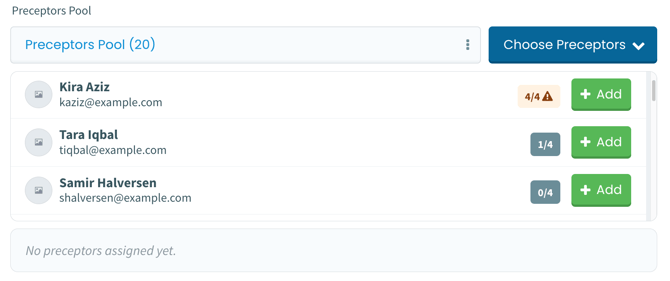
Learning Events
Simplified Learning Event Content Saving
The Event Content page has been updated to reduce duplicate save actions and simplify the interface. A single persistent "Save" control is now available at the bottom of the screen while working on learning event content, making the page easier to use without requiring extra scrolling.
Thank you to Miami Miller School of Medicine for their observations and valuable feedback, which helped inform this enhancement.
Learning Event Statistics Page Loading
Resolved an intermittent issue where the Learning Event Statistics tab returned an error. With this update, the statistics page now loads consistently.
Thank you to National University of Singapore for their observations and valuable feedback, which helped inform this enhancement.
Custom Event Audience Selection
Previously, an issue prevented available groups from appearing in the Custom Event Audience dropdown when creating Learning Events. Now, administrators can once again select custom group audiences from the Associated Learners section.
Thank you to Arizona State University, Lee Kong Chian SOM, University of Pittsburgh SOM, University of Nevada Reno SOM, and University of Washington SOM for their observations and valuable feedback, which helped inform this enhancement.
Courses and Communities
Course Contact Order Configuration
Course contact ordering in the community now follows the order configured on the course setup page. Reordered contacts displayed in the course community will remain aligned with the saved course contact sequence.
Grading and Exams
Team-Based Learning Feedback
With this update, TBL enabled exams now provide the expected answer feedback after learners save a response. Learners will again receive confirmation for correct answers and retry prompts for incorrect answers.
Thank you to the University of Arizona for their observations and valuable feedback, which helped inform this enhancement.
Course Grade Data Added to Nightly Exports
Nightly export data has been expanded to include course grade information for administrators. With course grade data now included alongside existing export records, administrators can more easily access the information they need for analysis and operational decision-making.
If you have any questions about the above-listed information, please contact support@elentra.com. If you see a feature that is not currently being used within your instance of Elentra and are interested in learning more about it, please contact your Elentra Account Manager for more information.