![elentra_logo_Blue-and-Black-3.png]](https://help.elentra.com/hs-fs/hubfs/elentra_logo_Blue-and-Black-3.png?height=40&name=elentra_logo_Blue-and-Black-3.png)
Article Contents
This article covers the following topics. Click on the topic to go to that section of the article.
- Assessment & Evaluation Reports Overview
- Assessment & Evaluation Reports tab
- Elentra Analytics Reports
- User A&E Reports
Assessment & Evaluation Reports Overview
Reports on content contained within the Assessment & Evaluation (A&E) module are contained in several places in Elentra:
- Assessment & Evaluation Reports tab (in Admin> A&E> Reports)
- Elentra Analytics, in the following folders:
- Assessment Reports
- Distribution Reports
- Evaluation Reports
- In a user's A&E badge in the Reports section
Reports in the A&E Reports tab in the UI are available to Medtech:Admin users for all content. Other users - Staff:Admin, Staff:PCoordinator, and Facutly:Director users - will be able to report on A&E content where they have been permissioned (at the individual, course, or organization level). Elentra Analytics reports are available to Medtech:Admin and Staff:Admin users, regardless of permissions applied to specific A&E content. Reports in an individual's A&E badge Reports section are made available to the specific user based on settings configured within a given distributions. In this section, users will only see aggregated content where they are the target of the form, and the report has been configured to be released to the targets. Reports in this section are on a per-distribution basis, and users can only see content related to assessments/ evaluations where they are the target. Users cannot see reports on other users in this section.

Assessment & Evaluation Reports tab
The reports in the administrative A&E Reports tab are divided into the following sections:
- Evaluations
- Assessments
- Leave
- Distributions
Evaluations
Reports in this section refer to evaluation type tasks, where something other than a learner has been assigned as the target of the task. Reports will either be based on distributed tasks, on-demand tasks, or standard evaluation tasks. See the A&E Reports page here for more details on each of these reports.
Rotation Evaluations (Aggregated): This report aggregates the results of evaluation distribution tasks where the rotation is the target. It does not include the results from the standard rotation evaluation forms.
Learning Event Evaluations (Aggregated): This report aggregates the results of learning event evaluation forms that were delivered via learning event based distributions where the event is the target of the form.
Learning Event Feedback Forms (Aggregated): This report aggregates the results of learning event feedback forms that have been attached as Resources to learning events in the system.
Faculty Reports (Individual, Aggregated): This report aggregates the results of evaluation forms delivered via distribution where the faculty is the target of the task. It generates separate reports for each faculty member selected who has had forms completed on them.
Faculty Reports (Overview, Averaged): This report displays the average of each selection that was made by evaluators for each item in the form for each target on whom the form was completed. Commentary for each target is listed below the table of total selections for each form item.
Faculty High/Low Reports: This report takes a total of all evaluations where the faculty is the target, and splits the rating scale into low and high responses. For each faculty target, the report indicates the highest score that they received for each question and also shows the lowest low score and the highest high score across all faculty for each question.
Standard Faculty Evaluations (Aggregated): This report aggregates the results of the standard faculty evaluation form on a per faculty basis that have been delivered via distribution only.
Course Reports (Aggregated): This report aggregates the results of program evaluation forms delivered via distribution where the course is the target of the tasks.
Individual Learning Event Evaluations: This report generates the results of learning event evaluation forms that were delivered via learning event schedule-based distributions. Results are not aggregated.
Automatic Rotation Evaluations (Aggregated): This report aggregates the standard rotation evaluation forms when set up to deliver automatically through the rotation scheduler.
Assessments
Most reports in this section refer to assessment type tasks, where the learner has been assigned as the target of the task. Some reports refer to CBME-specific use cases.
Learner Assessments: This report allows you to compile all assessments completed on a target in one or more courses into one or many files. It does not aggregate results, just compiles multiple forms.
Learner Reports (Aggregated): This report generates an aggregated report of results for a selected assessment form for each selected learner for the date range identified. It includes only distribution-based tasks completed on selected learner(s).
Timeliness of Completion Report: This report identifies the number of tasks delivered, the number of tasks completed, the average number of days it took for an assessor to complete a task after the end of an experience, and the average number of days that it took the assessor to complete a task from the date it was delivered. The report only includes distribution-based tasks.
Assessment Tools Feedback Report: This report collates all of the feedback from the Assessment Tool Feedback item on CBME forms (e.g., “ Have feedback about this form? (eg, "Missing Dx", etc.)?”).
Triggered Assessments Report: This report generates a CSV that displays how many tasks triggered on a learner have been completed, per block per course/program for the selected curriculum period.
Triggered/Completed Assessments by Faculty Report: This report generates a CSV that displays Total Assessments, Total Completed, Total Pending, Total In Progress, Total Deleted, and the Average Completion Time (hh:mm:ss) for each faculty member selected.
Assessment Tool Data Extract: This report generates one CSV file per tool (you can select multiple tools at the same time) and lists all completed instances of that tool across all learners within a custom date range.
Form Responses Report: This report provides data from both assessment and evaluation distributions. It provides an overview while also generating a CSV that displays all/selected assessment responses for a specified course, form, assessment status and date range.
Leave
Leave reports refer to the Clinical Experience module, despite being contained in the A&E Reports tab. See the Clinical Experience Reports Knowledge Base article for more information.
Distribution
Distribution Delivery Schedule: This report provides an inventory of your distributions. It can be used to generate two different reports: summary of distribution report, or individual tasks report. Course/program(s), date range, task type(s), and distribution(s) are customizable for both reports.
Distribution Reviewer: This report provides an overview of completed tasks for a particular form associated with those distributions for which you have been set as a reviewer.
Embedded Distribution Reviewer: This is the same as the Distribution Reviewer Report (Provides an overview of completed tasks for a particular form associated with those distributions for which you have been set as a reviewer), but provides it in the interface without the requirement to open a PDF to view the results.
Weighted CSV Report: This report provides a CSV file that includes the data collected through completed forms, listing users who completed the form down the side and form items across the top. Inside each cell will be data from the form representing the scale ratings made by those who completed the forms, whether a weight has been provided for each rating by a developer or not.
Elentra Analytics Reports
Assessment Reports
Faculty Timeliness of Completion Details: Detailed view of faculty and number of days between delivery and completion of the assessment.
Faculty Timeliness of Completion Summary: This report identifies the number of tasks delivered, the number of tasks completed, and the average number of days it took for an assessor.
Form Response Report: Provides an overview that displays all/selected assessment responses for a specified course, form, assessment status and date range
Form Response Report – By Assessor: Provides an overview that displays all/selected assessment responses for a specified course, form, assessment status and date range
Form Response Report – With Q&A: Provides an overview of all distributed forms and associated information, including all/selected assessment responses and comments.
Item Response Summary Report: This report shows the number of responses each scale item received.
Learner Reports (Aggregated): Generates an aggregated report of results for a selected assessment form for each selected learner for the date range identified. Includes only distribution-based tasks completed on the selected learner(s).
Reopened Forms: This report contains "Reason for Reopening" details for distributed forms that have been reopened at some point in time.
Distribution Reports
Distribution / Assessor Completion Matrix: This report presents a matrix that compares the completion count of various distributions by different assessors. It provides an easy way to visualize which assessors have completed their assigned tasks, helping to track the progress of assessment completion.
Distribution Completion Rate: Display rate of completion for distributions along with counts of associated statuses. Includes drill through to assessment/evaluation details.
Distributions by Form: This report allows users to review created distributions and filter by form.
Evaluation Reports
Course Reports (Aggregated, Matrix): Aggregates the results of program evaluation forms delivered via distribution.
Faculty Report (Individual, Aggregated, Matrix): Displays the aggregates of the results of faculty evaluation forms delivered via distribution.
Learning Event Evaluations (Aggregated, Matrix): Aggregates the results of learning event evaluation forms delivered via distribution.
Rotation Evaluation Report (Aggregated): A report containing the responses for rotation evaluations sent out via distribution
Standard Rotation Evaluation Delivery Schedule: The report details the schedule for standard rotation evaluations, allowing for filters on the rotation, block, and anticipated delivery date.
User A&E Reports
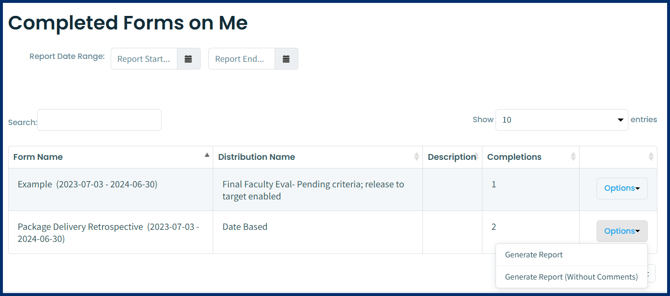
Every Elentra user has an Assessment & Evaluation badge in the top right corner of their Elentra application, which is where tasks assigned to the user will appear. Within the user A&E badge, there is a Reports tab where a user can view summary reports of tasks completed on them, if the distribution has been configured to release the report to the target of the distribution. From the My Reports button on the right hand side of the page, learners can access reports on forms completed on them. The results can include on-demand and distributed tasks. Reports can be generated with or without anonymous comments.