![elentra_logo_Blue-and-Black-3.png]](https://help.elentra.com/hs-fs/hubfs/elentra_logo_Blue-and-Black-3.png?height=40&name=elentra_logo_Blue-and-Black-3.png)
This release gives administrators more control over enrolment changes in closed curriculum periods and makes it easier to see which distributions use an assessment form. Improvements have also been made to event editing, community navigation, attendance reports, and PDF submissions.
Coming Soon: AI Assessment Comment Summaries - CBE Learner Dashboard. This feature will be off by default, and administrators can choose to enable it for their organization. Explore the details below!
New in Elentra
Setting to Manage Enrolment Additions and Removals for Past Course Periods in Imports
Elentra now includes a Core Data Import Settings page in Admin > System Settings. A new organization-level setting on this page controls whether the Core Data Import can add or remove learner enrolment in closed curriculum periods.
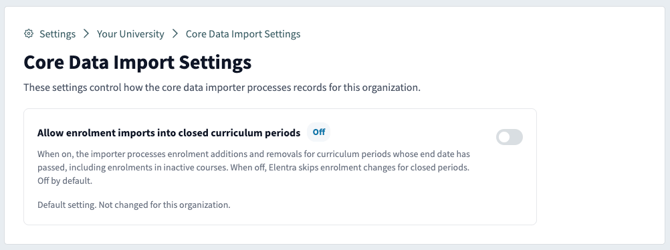
Core Data Import Setting is turned off by default.
List of Distributions on the Form View
Assessment administrators can now see a list of the distributions that use a form right at the top of the form view page. You can find it by opening any form from the forms area of Admin > Assessment & Evaluation. This makes it much easier to understand where a form is in use before you make changes to it.
Improvements
A Clearer Privacy Choice at First Sign-In
Choosing a privacy level is now a simple, one-time step. The prompt users see at first sign-in now matches the refreshed Privacy Preferences page, with easy-to-compare options and previews of what others will see. Once a level is saved, users go straight to the page they were signing in to and are not asked again, resolving an issue where some users were prompted at every sign-in.
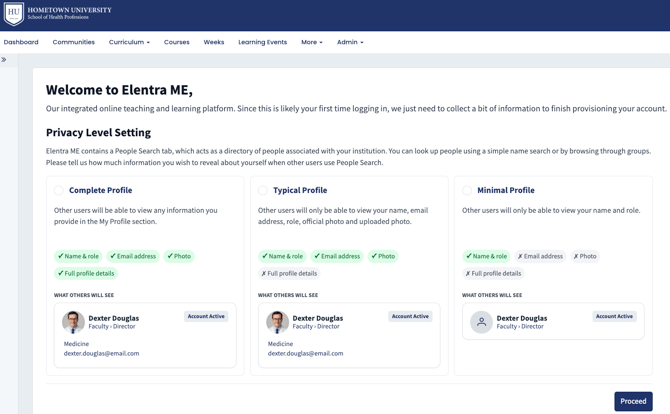
Privacy Choice on First Sign-In
Warnings When Pasted Event Text Is Cut Short
Elentra now displays a warning when text pasted from a Word document is cut short in event fields such as Event Description and Required Preparation. This gives you a chance to review and correct the text before saving so learners see the complete event details.
Community Sidebar Page Order
The community sidebar now displays pages in the order administrators save in Manage Pages, so members can find content where they expect it.
Community feedback plays an important role in improving Elentra. Thank you to the National University of Singapore for sharing the observations that helped inform the Community Sidebar Page Order enhancement.
Attendance Reports Load for the Selected Date Range
Addressed an issue where the Attendance Report in Absence Management kept loading and never produced results after a date range was added. Staff can now generate the report and review attendance information as expected.
Thank you to Orlando College of Osteopathic Medicine for their observations and valuable feedback, which helped inform the Attendance Reports Load for the Selected Date Range enhancement.
PDF Submissions Complete in Gradebook Dropboxes
Addressed an issue where learners could not finish submitting a PDF file to an assignment Dropbox in Gradebook. Uploaded files now complete the submission and appear in the Dropbox. Learners can turn in their work with confidence.
Thank you to Texas Tech University, Health Sciences Centre, El Paso for their observations and valuable feedback, which helped inform the PDF Submissions Complete in Gradebook Dropboxes enhancement.
Coming Soon: AI Assessment Comment Summaries
Competency committees and reviewers view dozens of workplace-based assessments per learner each review period, and reading every narrative comment to build a picture of progress can take hours. Patterns across assessors are also easy to miss.
Our goal is to reduce administrative effort and make complex information easier to work with, while keeping educators in control. Assessment Comment Summaries are one of the first AI capabilities supporting this direction, helping reviewers and learners bring narrative feedback together to support informed conversations about progress.
Elentra will soon draft a summary of each learner's narrative comments across their assessments, available on the CBE Learner Dashboard. Each summary shows when it was generated and the number of comments, assessors, and dates it draws from, and is organized into five sections:
- Summary: an overview of the learner's overall progress.
- Rating Trend: how the learner's performance has changed over time.
- Strengths: what assessors consistently highlight.
- Areas to Develop: recurring gaps and areas for growth.
- Suggested Next Steps: focused actions to support continued progress.
Reviewers can copy the summary, regenerate it, and indicate whether it was helpful. A notice on each summary clarifies that it is AI-generated and not part of the official assessment record.
Every point in the summary links back to the assessments behind it, so reviewers can check the source comments at any time. Summaries describe the evidence only. Progress decisions remain with committees and coaches.
For learners
Learners will also see a summary of the narrative feedback across their CBE assessments. The summary brings together what assessors are saying, highlights trends and areas to focus on, and links back to each original comment. This helps learners make sense of their feedback as a whole rather than one assessment at a time, and gives them a clearer starting point for conversations about their progress.
Why it matters
- Reviewers can understand a learner's progress in minutes rather than hours.
- Meeting preparation becomes more consistent across reviewers and learners.
- Learners gain a clearer, more complete view of the feedback they are receiving.
Availability
Assessment Comment Summaries are one of the first AI capabilities planned for Elentra, targeted for release in the coming weeks. As with all upcoming AI capabilities, Elentra will provide administrators with settings to control whether the feature is enabled for their organization.
If you have any questions about the above-listed information, please contact support@elentra.com. If you see a feature that is not currently being used within your instance of Elentra and are interested in learning more about it, please contact your Elentra Account Manager for more information.