![elentra_logo_Blue-and-Black-3.png]](https://help.elentra.com/hs-fs/hubfs/elentra_logo_Blue-and-Black-3.png?height=40&name=elentra_logo_Blue-and-Black-3.png)
This release introduces centralized controls for assessor email notifications, along with improvements to report exports, distribution searches, peer assessments, learner levels, and N/A response calculations. Explore the details below!
NEW! Assessment Notification Settings
The Assessment & Evaluation Settings page now includes an Assessment Notifications section. Administrators with organizational editing permissions can configure:
- New Task Email: Sends an email for each task created by a scheduled distribution. This setting is on by default and does not affect emails for delegated or on-demand tasks.
- Daily New Task Summary: Sends each assessor one daily email listing their new distribution tasks. Tasks that have already triggered an individual email are excluded.
- Weekly Pending Task Reminder: Sends each assessor one weekly email listing all outstanding tasks, including on-demand tasks, approvals, and delegations. Organizations can choose which day the reminder is sent.
The settings page is also now organized into collapsible sections (General, On-Demand Assessments, and Assessment Notifications) to make it easier to navigate.
Each organization’s existing new task email and daily summary configuration has been preserved. All changes to these settings are recorded in the settings audit log. Learn more in the support documentation.
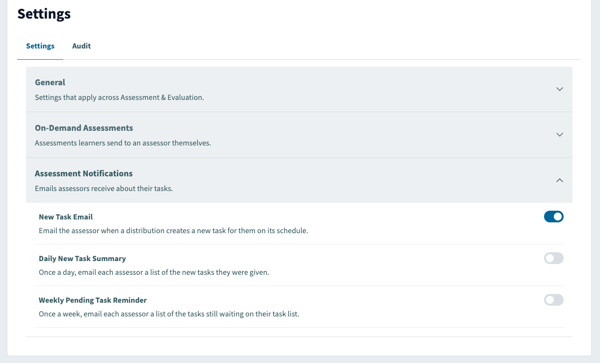
Control which assessment task emails assessors receive with notification toggles.
Question Text in Faculty Report Exports
Questions in the Faculty Report (Overview, Averaged) CSV export now appear as clean, readable text without extra formatting code. Download the report from Admin > Assessment & Evaluation > Reports for easier review and analysis.
Community feedback plays an important role in improving Elentra. Thank you to Creighton University for sharing the observations that helped inform the above enhancements.
Curriculum Period Filter in Distribution Search
Previously, filtering by curriculum period alone returned only course evaluation distributions. With this update, filtering distributions by curriculum period returns both course and faculty evaluation distributions, whether or not a course filter is applied.
Thank you to Queen's University for their observations and valuable feedback, which helped inform this enhancement.
Self-Assessment Exclusion in Peer Assessment Distributions
Addressed an issue where the Exclude Self Assessments option in delegation based peer assessment distributions did not stop learners from delegating or completing a form about themselves. The option now works as expected, so learners can no longer be assigned to assess themselves. This helps programs keep peer assessment results accurate.
Learner Levels in Assessment and Evaluation
Addressed an issue where learner levels appeared as inactive in the Assessment & Evaluation: Learners view even though the learners were actively enrolled and their assessment plans were active. Administrators can now filter by program and see learner levels when reviewing learner progress.
Thank you to University of British Columbia for their observations and valuable feedback, which helped inform this enhancement.
Handling of N/A Responses in Gradebook Forms
N/A and similar responses on forms attached to gradebook assessments are now treated as null values, with their weight redistributed across the remaining items. This ensures rubric-based grades reflect the applicable assessment items.
Community feedback plays an important role in improving Elentra. Thank you to the University of Global Health Equity for sharing the observations that helped inform this update.
Login today to explore these enhancements in action!
If you have any questions about the above-listed information, please contact support@elentra.com. If you see a feature that is not currently being used within your instance of Elentra and are interested in learning more about it, please contact your Elentra Account Manager for more information.