![elentra_logo_Blue-and-Black-3.png]](https://help.elentra.com/hs-fs/hubfs/elentra_logo_Blue-and-Black-3.png?height=40&name=elentra_logo_Blue-and-Black-3.png)
This release introduces new ways to manage profile photos, including flexible cropping options for bulk imports and individual profiles. We've also improved Form Response Reports to display all selected answers, added course search when creating events, and simplified site selection in the Elentra mobile app. Together, these updates help streamline everyday tasks and make navigating Elentra easier.
NEW! Course and Event Files Through the API
Your course and event files can now flow into the other tools your school relies on, such as AI study tools, data warehouses and other learning systems. Your technical team can retrieve the files attached to courses and learning events directly through the Elentra API, so learning materials no longer need to be downloaded by hand or uploaded twice.
- See what's available: every shared file, with its course and event details.
- Pick up only what changed: a weekly or monthly check stays small and quick.
To get started, submit a request through the Member Support Portal. To learn what's included and how it works, see the Accessing Course and Event Files Through the Elentra API Knowledgebase Article.
We are exploring extending this to assignment (Dropbox) files.
Thank you to Case Western Reserve University, the National University of Singapore and Queen's University for the ideas and feedback that made this possible.
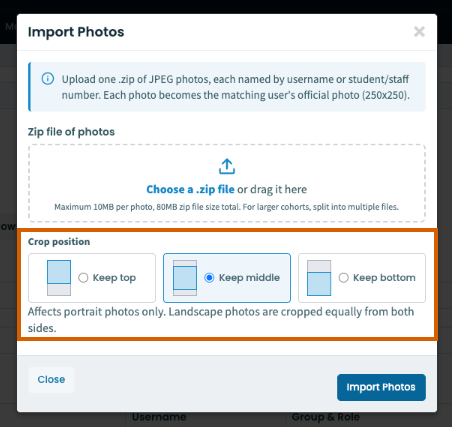
NEW! Select a Crop Position When Bulk Importing Profile Photos
Administrators can now select a crop position that applies to all photos in a bulk import. This gives schools more flexibility to match the import to how their headshots are taken, so a full class can be imported consistently without editing photos beforehand. The default keeps the existing behavior, so current import processes are unaffected.
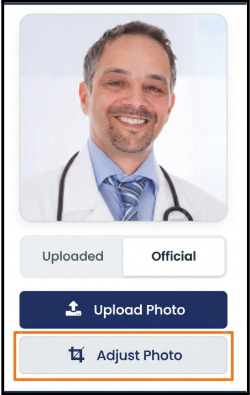
NEW! Adjust Uploaded Profile Photos
Administrators can now adjust the crop of an official profile photo directly on the user’s profile, without needing to edit the photo outside Elentra and upload it again. The Upload and Adjust photo options have also moved below the profile picture so they no longer cover the image.
See All Selected Answers in Form Response Reports
The Form Response Report now displays every selected answer for questions that allow multiple responses. Previously, only one answer appeared, even when respondents selected several options. This update gives you a complete view of submitted responses, with results that match the original form submissions and the Weighted CSV Report.
Community feedback plays an important role in improving Elentra. Thank you to Hackensack Meridian School of Medicine for sharing the observations that helped inform this update.
Find Courses Faster When Creating Events💡
When creating an event, administrators can now search for a course by name instead of scrolling through the full course list. This makes it quicker to find and select the right course, especially for institutions managing a large number of courses.
💡Thank you to University of Arizona for submitting the Course Search When Adding Events idea through our Ideas Portal and helping shape this enhancement.
Many of our enhancements begin with ideas from our community. If you have a suggestion, submit it through our Ideas Portal, we'd love to hear from you!
Simplified Site Selection in the Elentra Mobile App
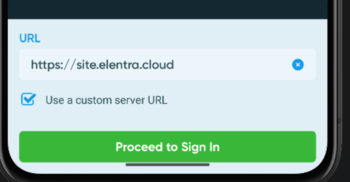
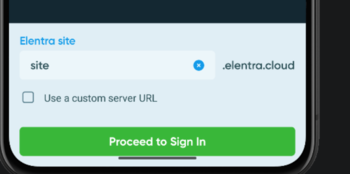
Signing in to the Elentra mobile app is now simpler. When selecting your institution's site, you only need to enter its subdomain instead of the full URL reducing the amount of information you need to enter.
Before:
After:
Thank you to University of British Columbia for their observations and valuable feedback, which helped inform this enhancement.
If you have any questions about the above-listed information, please contact support@elentra.com. If you see a feature that is not currently being used within your instance of Elentra and are interested in learning more about it, please contact your Elentra Account Manager for more information.