![elentra_logo_Blue-and-Black-3.png]](https://help.elentra.com/hs-fs/hubfs/elentra_logo_Blue-and-Black-3.png?height=40&name=elentra_logo_Blue-and-Black-3.png)
This release introduces an update designed to reduce manual work when managing faculty teaching time, along with a preview of new functionality coming to Clinical Experience. Teaching Minutes can now automatically populate based on event duration, while the upcoming Agreements tab will make it easier to track agreement status, identify upcoming expirations, and understand how agreements may affect learner bookings. See the details below!
Automatically Populate Teaching Minutes
A new Teaching Minutes default setting has been made available in Elentra! When your organization enables this setting—which is on by default—the Teaching Minutes field will now auto-fill with the event's total duration when you add a faculty member to an event's Associated Faculty list. This reduces manual entry for the most common scenarios, while still allowing you to edit the value for each faculty member as needed.
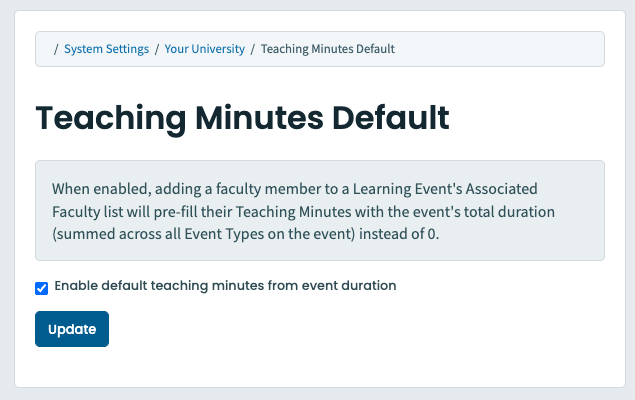
Can be changed in System Settings
Coming soon: Agreements tab in Clinical Experience
Know which agreements need attention, and which learners they affect, before it becomes a scheduling problem.
The new Agreements tab brings every site and instructor agreement in your organization into one view. It turns agreement tracking into a clear, prioritized picture of what needs action and how it affects your schedules.
At a glance, you'll see:
- What's expiring soon. Agreements coming due in the next 30, 60 or 90 days, each with a days-left countdown.
- Where your schedules are exposed. Learner bookings that run past an agreement's expiry, counted and ready to review.
Click any bookings count to see exactly which placements are affected. From there, jump straight to the site or instructor record to renew and keep learners on track. Status, expiry dates and proof-of-agreement files are all in one searchable, sortable table. You can save and share filtered views so your whole team works from the same priorities.
The result: fewer surprises, faster renewals, and schedules you can trust.
Watch for availability details in an upcoming release.
If you have any questions about the above-listed information, please contact support@elentra.com. If you see a feature that is not currently being used within your instance of Elentra and are interested in learning more about it, please contact your Elentra Account Manager for more information.