![elentra_logo_Blue-and-Black-3.png]](https://help.elentra.com/hs-fs/hubfs/elentra_logo_Blue-and-Black-3.png?height=40&name=elentra_logo_Blue-and-Black-3.png)
This week’s updates make reporting and exports more reliable, improve how large reports are generated, and make it easier to find the right information across Elentra. We’ve also enhanced the Panopto integration to keep recordings organized by course and added more context when filtering the rotation schedule. Explore the details below!
Enhanced Reporting for Large and Complex Data Sets
We’ve made improvements to how Elentra generates reports, making it easier to work with larger and more complex data sets without interrupting your workflow.
Generate Large Weighted CSV Reports
Large Weighted CSV Reports can now be generated in the background when there’s more data to process. You can follow the report’s status and progress, leave the page while it generates, and return later to download the completed ZIP file. Generated files remain available only to the user who requested them, and a clear status lets you know if a report needs to be generated again.
Generate Up-to-Date Curriculum Review Reports
As part of this work, we’ve also improved the Curriculum Review report in System Reports, so you can generate an up-to-date report whenever you need the latest curriculum information.
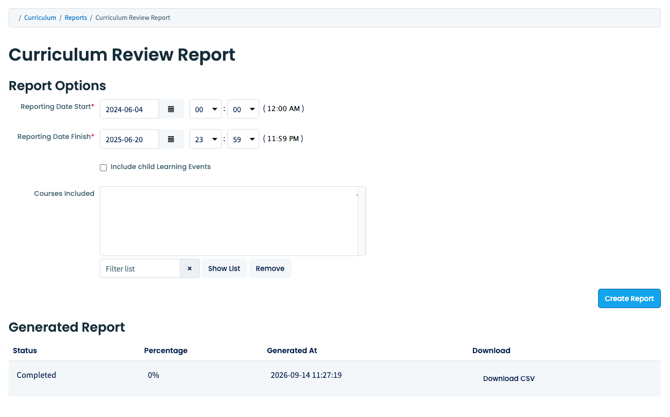
Community feedback plays an important role in improving Elentra. Thank you to Case Western Reserve University for sharing the observations that helped inform this update.
CSV Download Option for My Learners Reports
The CSV download option is available again in My Learners reports. Staff reviewing learner assessment reports can once again export report data as CSV in addition to PDF, making it easier to work with assessment information outside of Elentra.
Thank you to Texas Tech University, Health Sciences Centre, El Paso for their observations and valuable feedback, which helped inform this enhancement.
Filtering in Weighted CSV Reports
Weighted CSV Reports in Assessment & Evaluation now generate consistently when filtering by courses, forms, and distributions. Reports no longer return an error or omit selected filter options, helping ensure the exported data reflects the criteria you selected.
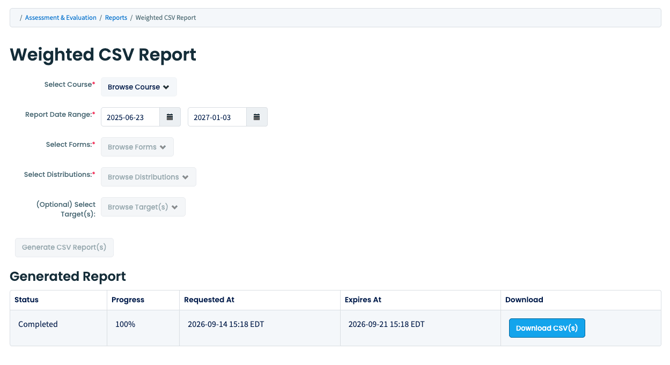
Community feedback plays an important role in improving Elentra. Thank you to Nova Southeastern University for sharing the observations that helped inform this update.
Grade Below Threshold Notifications
Grade Below Threshold notifications are now sent correctly to learners who meet the configured notification criteria. Previously, learners with the same qualifying assessment result could be skipped unexpectedly. All learners who meet the criteria will now receive the appropriate notification.
Thank you to Case Western Reserve University for their observations and valuable feedback, which helped inform this enhancement.
Export Grade Spreadsheet Data as CSV
In some courses, exporting grades as a CSV from the Grade Spreadsheet could return an error. This issue has been resolved, allowing users to successfully download grade data as a CSV for further review or analysis outside of Elentra.
Community feedback plays an important role in improving Elentra. Thank you to University of Arizona for sharing the observations that helped inform this update.
Panopto Integration: Course-Level Folder Routing for Learning Events
Elentra now gives institutions more control over where Panopto recordings land when launched from a Learning Event page. When configured for the course-level, the course context is passed through to Panopto, so recordings route directly into the shared course folder specified during setup. This allows for recordings to be organized in one place rather than spread across separate per-event folders.
This change provides a cleaner, more consistent way to manage recordings at the course level, rather than tracking them down across individual events.
Note: Institutions switching from event-level to course-level context should expect Panopto to create a new folder going forward, since existing files won't move automatically. Recordings already sitting in event folders can be moved manually into the correct course folder in Panopto.

Course Groups in the Rotation Schedule
When filtering the rotation schedule by course group, each group now displays the course it belongs to. This additional context makes it easier to distinguish between groups when multiple courses use similar or identical names, helping you quickly select the right group and see the learners and bookings you are looking for.
Log in to Elentra today to experience these enhancements!
If you have any questions about the above-listed information, please contact support@elentra.com. If you see a feature that is not currently being used within your instance of Elentra and are interested in learning more about it, please contact your Elentra Account Manager for more information.