![elentra_logo_Blue-and-Black-3.png]](https://help.elentra.com/hs-fs/hubfs/elentra_logo_Blue-and-Black-3.png?height=40&name=elentra_logo_Blue-and-Black-3.png)
This release brings a range of updates designed to make everyday workflows in Elentra more efficient. Highlights include a refreshed Elentra Support Portal experience, a new bulk import option for official profile photos, improved exam permissions and assessment workflows, and enhancements to Gradebook, Learning Events, and reporting. Together, these updates make it easier to manage users and course content, access the information you need, and complete common tasks across Elentra. Explore the full details below!
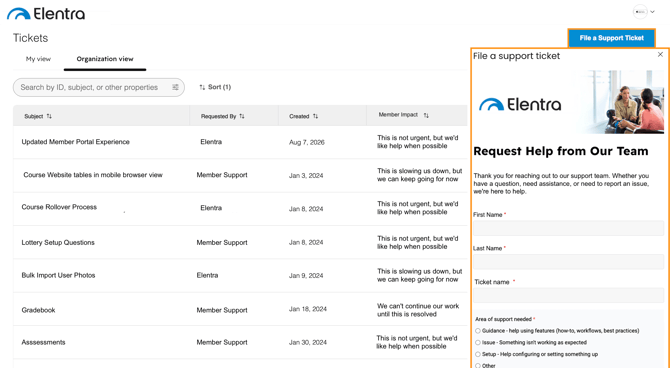
NEW! Updated Elentra Support Portal Experience
On Wednesday, August 12, the Elentra Support Portal will transition to an updated experience.
This update is part of a HubSpot platform migration and will provide a more streamlined and user-friendly experience for managing your support requests. Your existing access and support workflows will remain in place.
No action is required, and there will be no interruption to your access during the transition. Our team will manage the migration to ensure a seamless transition, and you can continue using the Member Support Portal as usual.
For more information, please refer to the Support Portal Knowledge Base.
User Management
NEW! Bulk Import Profile Photos
Admins can now upload official photos for multiple users at once directly from Manage Users, without needing to submit a request to Elentra Support. Simply upload a .zip file of photos and Elentra will automatically match them to user accounts, with a results summary showing which photos were imported successfully. For more information, please review the support article on Profile Photos.
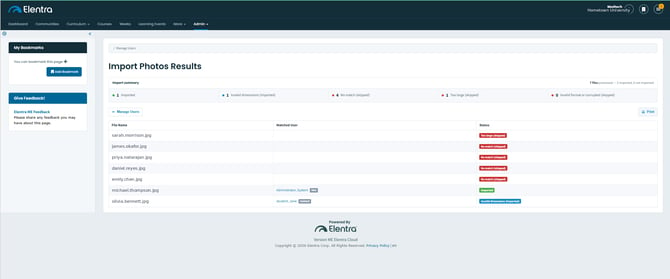
The Import Photos Results page
Assessments & Exams
Imported Exam Question Rationales Can Now Be Edited
Exam question rationales added through an import can now be edited directly in the question editor. This makes it easier to maintain and update imported question content without needing to recreate it.
Thank you to the University of Pittsburgh, School of Medicine for their observations and valuable feedback, which helped inform this enhancement.
Course-Level Permissions Now Apply to Exam Folders
Course-level permissions for exam folders now provide the expected access to users with the Faculty: Director role. Course directors associated with a permitted course can access the relevant exam folders without needing to be added individually as authors.
Thank you to Western University of Health Sciences for their observations and valuable feedback, which helped inform this enhancement.
Delegators Can View All Assigned Assessors
Delegators can now view all applicable learners and assigned assessors when opening rotation-based delegation tasks. Previously, adding a new learner to a rotation could cause the task to display only the newly added learner rather than the complete list.
Thank you to the University of Pittsburgh, School of Medicine and Texas A&M University for their observations and valuable feedback, which helped inform this enhancement.
Gradebook
Improved Downloading of Gradebook Dropbox Submissions
Addressed an issue where using Download All Submissions in Gradebook Dropbox could time out when downloading a large volume of learner submissions. Downloads for larger cohorts can now be completed without encountering the previous timeout error.
Thank you to the University of British Columbia for their observations and valuable feedback, which helped inform this enhancement.
Improved Gradebook Experience on Mobile Devices
The learner Gradebook has been updated to provide a more responsive experience when accessed from a mobile browser. Gradebook tables now adapt more effectively to smaller screens, reducing unnecessary horizontal scrolling, while the sidebar responds more appropriately to the available screen size.
Thank you to the University of British Columbia for their observations and valuable feedback, which helped inform this enhancement.
Learning Events
Official Profile Photos Display Correctly on Learning Events
Addressed an issue where official profile photos were not consistently displayed for some learners within learning events. When an official profile photo is set as the learner's primary photo, it now displays correctly in learning event views.
Thank you to the Lee Kong Chian School of Medicine for their observations and valuable feedback, which helped inform this enhancement.
Event Locations Included in Teaching Event Reminder Emails
Teaching event reminder emails now include the event location when one has been configured, giving recipients more complete event details directly in the notification.
Thank you to Queen's University for their observations and valuable feedback, which helped inform this enhancement.
Reporting
Special Characters Display Correctly in Evaluation PDF Reports
Special characters in evaluation questions now display correctly in the Learning Event Evaluations (Aggregated) PDF report, ensuring exported questions appear consistently with the original form.
Thank you to Yale University for their observations and valuable feedback, which helped inform this enhancement.
Log in to Elentra today to explore these latest enhancements and improvements!
If you have any questions about the above-listed information, please contact support@elentra.com. If you see a feature that is not currently being used within your instance of Elentra and are interested in learning more about it, please contact your Elentra Account Manager for more information.