![elentra_logo_Blue-and-Black-3.png]](https://help.elentra.com/hs-fs/hubfs/elentra_logo_Blue-and-Black-3.png?height=40&name=elentra_logo_Blue-and-Black-3.png)
Highlights from this release include the new Preceptors View, a refreshed Notification Preferences experience, and enhancements to Rotation Schedule Imports. Together, these improvements help streamline scheduling decisions, simplify system management, and support more efficient day-to-day operations. Explore the full list of updates below!
NEW! Preceptors View (Preview)
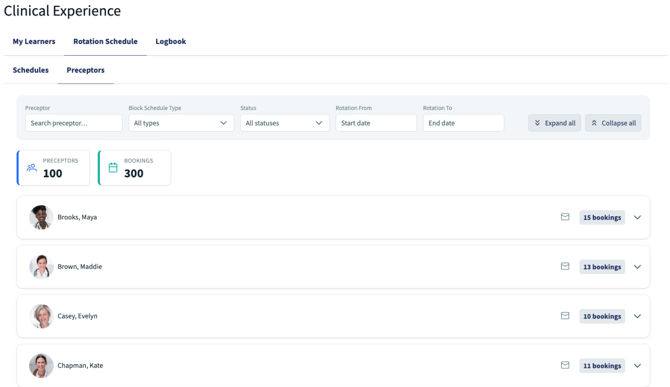
We're excited to announce that the new Preceptors View (Preview) is now available in Clinical Experience. The Preceptors View provides a centralized way to review preceptor bookings across rotation schedules, helping coordinators quickly understand supervision commitments when making placement decisions.
With this new view, admins can:
-
Quickly understand preceptor workload and supervision commitments
-
Make more informed placement decisions with greater visibility into current preceptor utilization and availability
-
Reduce the time spent reviewing individual learner schedules
-
Identify scheduling capacity and potential conflicts more efficiently
By bringing this information together in a single view, the Preceptors View makes it easier to understand current commitments and identify available capacity without manually reviewing multiple schedules.
The Preceptor View page has launch as an early Preview, allowing us to gather feedback through a short survey directly within the page and continue refining the experience based on input from the users who rely on it most.
Refreshed Notifications Preferences Page
The Notification Preferences page has been updated with a refreshed, more intuitive design. The new layout includes helpful tooltips and notification counts are included in the delete notification confirmation dialogue. This update is part of our ongoing effort to create a more modern, consistent, and user-friendly experience throughout Elentra.
Rotation Schedule Import: Greater Confidence and Control When Updating Schedules
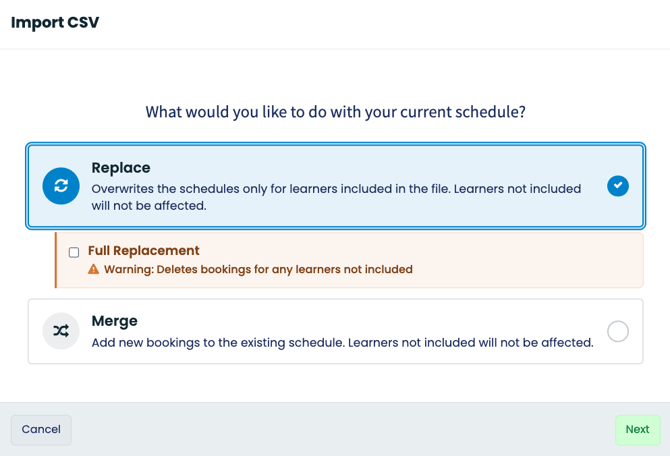
We've enhanced the Rotation Schedule CSV import experience to help reduce the risk of unintended schedule changes and provide greater confidence when updating learner bookings.
By default, Replace mode now preserves bookings for learners who are not included in the import file, helping prevent accidental disruptions to existing schedules. For situations that require a complete schedule refresh, a new Full Replacement option gives administrators the flexibility to remove bookings for learners not included in the CSV.
We've also improved import previews to make it easier to understand exactly which learners will be affected before changes are applied.
Explore how these new enhancements can help simplify your day-to-day experience in Elentra.
If you have any questions about the above-listed information, please contact support@elentra.com. If you see a feature that is not currently being used within your instance of Elentra and are interested in learning more about it, please contact your Elentra Account Manager for more information.