![elentra_logo_Blue-and-Black-3.png]](https://help.elentra.com/hs-fs/hubfs/elentra_logo_Blue-and-Black-3.png?height=40&name=elentra_logo_Blue-and-Black-3.png)
Removing "Add External Assessor" Option
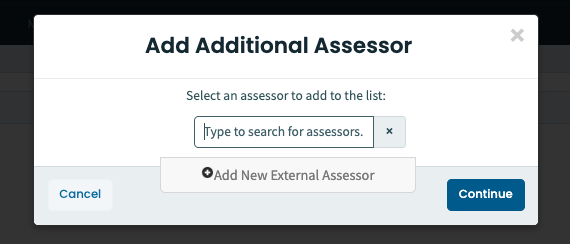
A new setting gives administrators more control over assessment workflows by allowing them to remove the “Add External Assessor” option for learners within a distribution workflow. The ability to select an existing internal assessor from the list remains intact when this setting is enabled.
Time Zone Alignment in Analytics
Regional time zone settings in Analytics have been updated to align with the Elentra database, ensuring greater consistency across reports.
Absence Request Management
Managing absence requests is now more seamless. Previously, when learners deleted an absence request, it remained visible under Pending Requests and required manual backend removal. Now, once a learner deletes an absence request, it is automatically removed from the admin dashboard.
Thank you to Wright State University Boonshoft School of Medicine for their observations and valuable feedback, which helped inform this enhancement.
Enhanced Mobile Viewing for Lecture Videos
Adjustments have been made to address an issue with how lecture videos were rendered on mobile browsers. Previously, videos accessed via mobile devices appeared zoomed in or cropped, preventing users from seeing the full lecture slides or demonstrations while the audio continued to play. Now, videos display in full, maintaining the correct aspect ratio, and users should be able to view the entire lecture screen.
Thank you to Lee Kong Chian School of Medicine for their observations and valuable feedback, which helped inform this enhancement.
Streamlined Exam Creation Within Folders
Creating exams within folders is now more intuitive. Previously, adding a new exam defaulted to a general location, requiring users to manually reselect their intended folder. Now, the system automatically selects the folder you are working in, reducing extra clicks and making the process more efficient.
Sign in today to see the latest enhancements in action!
If you have any questions about the above-listed information, please contact support@elentra.com. If you see a feature that is not currently being used within your instance of Elentra and you are interested in learning more about it, please contact your Elentra Account Manager for more information.