![elentra_logo_Blue-and-Black-3.png]](https://help.elentra.com/hs-fs/hubfs/elentra_logo_Blue-and-Black-3.png?height=40&name=elentra_logo_Blue-and-Black-3.png)
Rotation Schedule and Course Names
Addressed an issue where “undefined” appeared when selecting a course during rotation creation. Course names and codes now display correctly.
Thank you to Miami Miller School of Medicine, Texas A&M University, Medical College of Georgia for their observations and valuable feedback, which helped inform this enhancement.
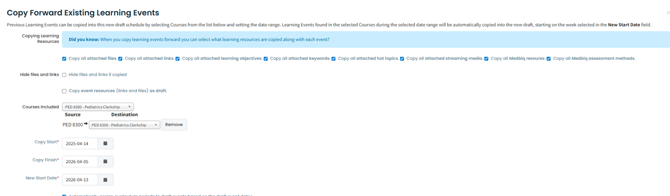
Improved Copy Forward for Learning Event Resources
Copying forward learning events into a new academic year is now more consistent. Previously, attached files were not always carried over when using the “Copy All Attached Files” option, requiring manual rework. Now, all attached resources are successfully included in new academic year drafts, saving time and ensuring continuity across curriculum.
Thank you to Wright State University Boonshoft School of Medicine for their observations and valuable feedback, which helped inform this enhancement.
Non-graduated Learners and Standard Faculty Evaluation Report
Adjusted the Standard Preceptor Evaluations: Aggregate report to include completed evaluations by non-graduating students when the "Include non-graduated learners" option is enabled.
Thank you to Queen's University Health Sciences for their observations and valuable feedback, which helped inform this enhancement.
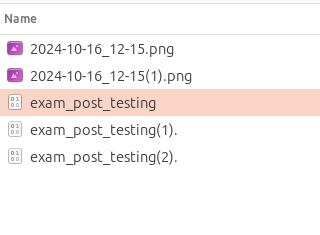
Improved Duplicate File Handling in Event Downloads
Updates to how the system manages downloading duplicate files within event lists have been made to ensure you never miss a document.
-
Change: Previously, if an event list contained multiple files with the same name, only one copy was included in the downloaded
.ziparchive. -
Resolution: All files are now preserved during the download process. To prevent overwriting, duplicate filenames will automatically have a numerical suffix appended (e.g.,
filename (1).pdf).
Geolocation Attendance Display Update
Previously, geolocation-based attendance could still appear even when the setting was turned off, causing confusion. This has been updated so that geolocation attendance is only displayed when enabled, ensuring a more consistent and predictable experience.
Thank you to Arizona State University for their observations and valuable feedback, which helped inform this enhancement.