![elentra_logo_Blue-and-Black-3.png]](https://help.elentra.com/hs-fs/hubfs/elentra_logo_Blue-and-Black-3.png?height=40&name=elentra_logo_Blue-and-Black-3.png)
Article Content Section
This article covers the following topics. Click on the topic to go to that section of the article.
- Overview
- Before You Begin
- New Enrollment Period Checklist
- Step 1 — Create the New Curriculum Period
- Step 2 — Review Courses
- Step 3 — Update Course Configuration
- Step 4 — Review Faculty Access
- Step 5 — Review Curriculum Mapping
- Step 6 — Configure Assessments and Gradebooks
- Step 7 — Copy or Create Learning Events
- Step 8 — Review Clinical Education (if applicable)
- Step 9 — Perform Final Quality Assurance
- Common Mistakes
Overview
The start of a new academic year or enrollment period is a significant administrative activity in Elentra. This guide provides a recommended sequence of tasks to help administrators prepare their institution for a new enrollment period.
Rather than providing detailed instructions for each task, this guide links to the relevant articles throughout the knowledge base. Think of this as your project checklist for annual setup.
Who should use this guide?
Anyone who is setting up new courses or performing a course rollover. This can include the following roles in an institution:
Program Administrators
Curriculum Coordinators
Medical Education Administrators
System Administrators supporting academic operations
Course Directors

Before You Begin
Before you can complete making changes for the new academic year, confirm:
- Your academic calendar has been finalized.
- Any curriculum changes have been approved.
- Faculty assignments are available.
- Student enrolment information is ready.
- Any new programs or courses have been identified.
Planning Tip
If your institution copies much of its curriculum from year to year, plan to complete setup before importing learners or publishing events. This makes it easier to identify and correct configuration issues before learners gain access.
New Enrollment Period Checklist
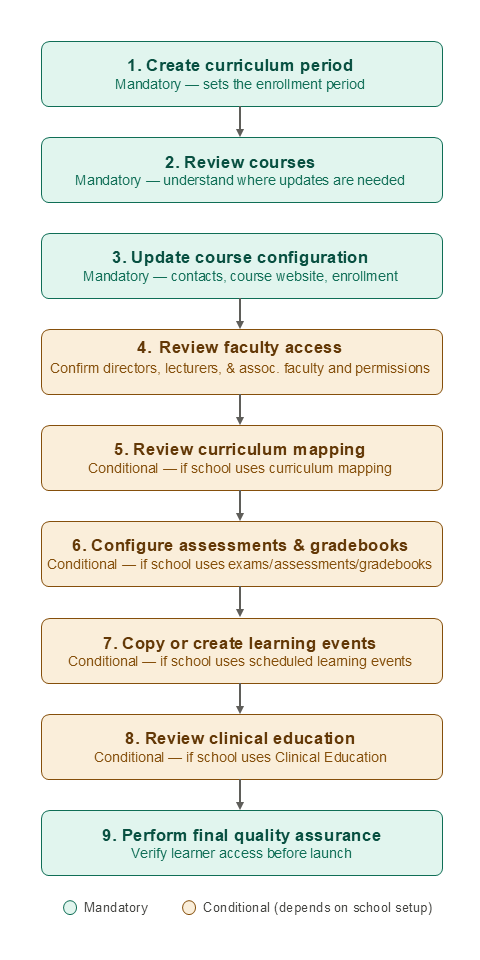
The following sequence reflects the order in which most institutions prepare for a new year.
Step 1 — Create the New Curriculum Period
Everything else depends on having the correct enrollment period available.
Typical activities include:
- Create the new curriculum period(s)
- Verify dates
- Confirm curriculum layouts
How-to articles
Verify
New academic year appears in the Curriculum Layout.
Step 2 — Review Courses
Determine whether each course will:
- Continue unchanged
- Require updates
- Be replaced with a new course
- Be retired
Remember that courses are the foundation for learning events, gradebooks, assessments, rotations, and other functionality.
How-to articles
Planning Considerations
Ask yourself:
- Have course directors changed?
- Are grading approaches changing?
- Are curriculum tracks changing?
- Will course website content be reused?
Step 3 — Update Course Configuration
Review course settings for the new curriculum period.
Typical tasks include:
- Course contacts
- Course visibility
- Curriculum periods
- Course enrolment settings
- Associated faculty
How-to articles
Step 4 — Review Faculty Access
Confirm:
- Course Directors
- Program Coordinators
- Associated Faculty
- Instructor permissions
How-to articles
Step 5 — Review Curriculum Mapping
If your curriculum has changed:
- Update curriculum tags
- Version your curriculum framework for a competency based education course/program
- Review learning objectives
- Confirm contextual linkages
- Verify curriculum reports
How-to articles
- Curriculum Tag Sets & Tags
- Course Curriculum Tags Tab
- Context-Based Linkages
- Curriculum Explorer
- Curriculum Search
- Curriculum Matrix
Step 6 — Configure Assessments and Gradebooks
Before learners begin:
- Review assessment forms & form templates
- Confirm assessment schedules
- Review assessment plan for a competency based education course/program
- Review exams & confirm exam schedule
- Review gradebook assessments
- Verify grading scales
How-to articles
Step 7 — Copy or Create Learning Events
Once courses exist for the new year, prepare the teaching schedule.
Many schools can save considerable time by copying forward the previous year's schedule and then updating dates, faculty, locations, or resources.
Typical tasks include:
- Copy event schedules
- Update instructors
- Update locations
- Review event resources
- Publish schedules
How-to articles
Step 8 — Review Clinical Education
For institutions using Clinical Education:
Review:
- Rotation schedules
- Lottery configuration
- Logbook requirements
- EPA distributions
How-to articles
Step 9 — Perform Final Quality Assurance
Before learners gain access:
Review:
- Sample learner account
- Sample faculty account
- Event calendar
- Course websites
- Gradebook visibility
- Assessment/Exam availability
Ask:
Can learners see only the courses they should?
Can faculty access their teaching?
Are events displaying correctly?
Are reports returning expected results?
Common Mistakes
Administrators preparing a new academic year often encounter the same issues. Before publishing courses, check for:
- Missing curriculum periods (Step 1)
- Learners not enrolled in courses (Step 2)
- Faculty not assigned as Associated Faculty or Course Directors (Step 3 & 4)
- Events copied without updated dates or locations (Step 7)
- Gradebooks not configured for the new curriculum period (Step 6)
- Assessments still linked to last year's schedules (Step 6)
Taking time to verify these items before learners begin can prevent many support requests.